

Google Analytics Glossary for Beginners
Need some help figuring out some things in Google Analytics? We've got you covered with this comprehensive Google Analytics Glossary.
Google Analytics UTM parameters explained
Top By Myriam Jessier•
We explain UTM links: how to create them, use them and analyze the data in Google Analytics. This is a useful guide if you want to figure UTMs out.

This is a quick guide to survival taken from my beginner Google Analytics course.
Let’s start by a quick definition: UTM stands for “Urchin Tracking Module”. Urchin was the old name of Google Analytics. Marketers use these UTM parameters as a way to track your incoming site traffic.
A UTM is used to measure the impact of your marketing efforts on different web platforms. UTMs can answer several questions marketers ask themselves: what is the best ad? What are the best geographic markets? Does the influencer marketing campaign work? The parameters in the UTM help you fill in some gaps in your analysis. They make attributing conversions to marketing efforts more precise. They also allow you to use default channels grouping (or your own) more efficiently.
Use UTMs only for marketing efforts that:
Even though it has less negative consequences in Google Analytics 4 compared to Universal Analytics, UTMs shouldn’t be used to track interactions on your website. Events are meant for that.
You could, in some cases, use them to track traffic from your different websites / apps however.
There are 5 standard UTM values: campaign, source, medium, term, and content.
You also have campaign ID which is optional and rarely used.
Out of the 5 standard UTM values, the first three parameters – source, medium, and campaign are strongly recommended. Term and content parameters are way more optional.
The source parameter is required.
UTM are URL parameters, meaning that they need to be added to the URL you want to send traffic to.
For instance, If your landing page’s URL is https://www.example.com, you will need to add at least the three key parameters we mentioned above to it: https://www.example.com?utm_source=facebook&utm_medium=paid&utm_campaign=black-friday. In this example, we tell GA4 that the visit/user arrived from a Facebook Ads campaign called “black-firday”.
You notice that all parameters start with “utm_” and that the first one is declared with a “?” and the following ones are separated by a “&”. After each parameter, you return a value with the “=” operator.
Note: UTM parameters can be used with other URL parameters. Just be careful, because, in an URL, the first parameter is always declared with a “?”, so if you add UTMs after other parameters, only use “&”. UTM builders normally should help you with that!
Here is the full list of parameters:
It depends on the information you are looking for as there are three keys dimensions available in Google Analytics 4 (GA4) in regards with campaigns:
One particularity that you will notice with campaigns in GA4 is the fact that, when you use one of these dimensions, the tool is going to list all types of traffic, even the ones which didn’t come from campaigns. For instance, GA4 is going to list (direct) as a campaign name for direct traffic.
Jonathan Moore, a senior Analytics consultant based in the UK, has this advice for you:
At the moment GA4 doesn’t have filters so it’s worth making sure any utm parameters you use are lower case. You can normalize parameters to lowercase in GTM, you need to be careful with case sensitive parameters like gclid.
You can track a campaign source, any marketing effort or just specific traffic source, for example: emailing flows, contests, promotions, links from influencers, banners on sites, white papers, links in employee signatures, QR codes and more.
Be careful, sometimes, UTMs fail when there is a redirect. Check for redirects stripping out parameters! Jonathan Moore has this other piece of advice for you: “I normally test this with dummy values. E.g. utm_campaign=test”
The answer is no if you connected your Google Ads account(s) to your Google Analytics 4 property(ies). You can connect up to 20 accounts and if you keep the default “auto tagging” feature, Google Ads will automatically feed data to Google Analytics (the campaign, ad group… that drove traffic and possibly conversions).
A good practice is to keep track of your UTMs so that you are able to find all the details you need over time, but also for consistency purposes.
After a few years, it is difficult to remember all the details of our web marketing campaigns. You can use a custom Excel file as a URL builder and to document my UTMs when I need a solution that’s fast, free, and usable by the majority of people.
You also have tools such as UTM.io which allows you to document everything neatly, add users and create UTM templates so that your colleagues can make their links well without having to stress. Not everyone is comfortable generating a UTM and this is where a tool can simplify the task for some.
We use both approaches with our clients, depending on their needs.
Google even offers a UTM builder to help you create your first UTMs. You can also use the template provided by Measure school. Mike Ginley, Senior SEO at Humana swears by it!
You can’t do whatever you want with UTM parameters. You must respect some conventions (kind of like UTM codes). Indeed, you need to stick to the ones we listed before.
It can be the result of different issues. The most common one is when you use a source / support combination that GA4 can’t categorize in its default channel groups (check this neat documentation for tall the details, go to directly to “Channels for manual traffic”, Google explains how a session / user is categorized in a channel). Analyze the traffic in the “Unassigned” channel to see if your campaign traffic is in there. With that said, let’s note that you should see your campaign with the campaign dimensions we mentioned earlier.
The other main cause for that issue is that your UTM was just badly structured or built (maybe you made an error in the parameters, with “utm-source” instead of “utm_source”, for instance). That’s why keeping track of your UTMs is very useful.
Unfortunately, there are also other possible scenarios which could explain why you don’t see your campaign. One is thresholding if you activated the Google signals. However, starting from February 2024, it shouldn’t be too much of an issue anymore. Another could be data sampling.
Also, make sure to use the right dates!
The parameter is meant to track your sources of traffic. The traffic source, or utm_source, is the only mandatory element of a UTM.
The source is the most precise information of where the session/user came from. Here are some examples:
Here is what you must put in the campaign medium of any link you track:
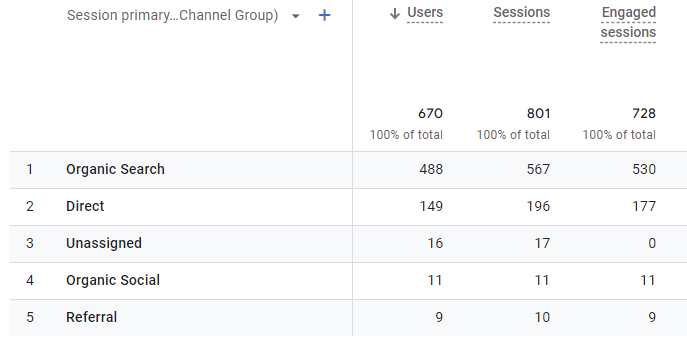
Anything that is not tracked with the correct terminology in UTM medium will fall into the “Unassigned” channel. It happens when GA4 doesn’t recognize the source / medium combination based the default channel groups.
One way to check this in reports (although this can be done in Explorations too) is to click on Traffic Acquisition, use the Default channel grouping dimension, then add as a secondary dimension Session Source / Medium. You might see some traffic as Unassigned when really it should be Organic Social for example. You will also find some (not set) values which can be linked to several issues.
Taking a look at the rules can help to change the UTMs you use that mean they go into the right spot. Of course, that doesn’t always work - what about tracking QR codes for example? Offline marketing to online - well you can create custom channel groups to help with that. You could create a channel called ‘Offline’ and then any QR codes you are using (with the correct UTMs set up) for example will go in that Offline channel.
Kyle Rushton McGregor, a GA4 expert, has concrete advice when it comes to QR codes:
“I’ve done this with an e-commerce client that has stores too - their QR codes linked to videos and information about the product. Initially that traffic was going into Unassigned but now we can see the role those QR codes are playing online as we’ve placed them into a Channel Group called Offline.”
Before we go any further, I would recommend you to follow Azeem’s advice and bookmark Claire Carlile’s UTM guide: “Anything UTM related, I’d do whatever Claire Carlile tells me to do. Her guide has saved me so many times in the past.”
Although the value of utm_campaign is optional, it is strongly recommended. If omitted, the value is reported as “(no set)” in Google Analytics. If you don’t put your campaign name in the UTM, your marketing campaign won’t be listed for the campaign dimensions… or anywhere else. Don’t forget to specify your campaign.
If the campaign is recurring from year to year, a clear nomenclature should be provided: campaign name + year. There are a few schools of thought on values for the utm_campaign. I’ll cover two approaches.
Most marketers follow this approach. It consists of using the name of the marketing campaign used internally as the value for utm_campaign:
The second approach is to use a high level strategic value for the universal marketing campaign that identifies the product / category / event being promoted or the higher level marketing or promotion objective. This idea is closer to the classic concept of a traditional marketing campaign. The campaign is the same but broadcast on several marketing channels. This is what we use when we have recurring campaigns like Black Friday, Valentine’s Day, etc.
The utm_content field is meant to be used to give details about the content of the page / platform that is bringing you the traffic. But then again, you can use it however you like to segment your data based on certain parameters, like language, geo-targeting, or more.
Rather than just identifying paid keywords like the utm_term field, utm_content is intended to provide more context around the actual content being promoted or shared.
Some common uses of utm_content include:
The utm_content field gives you flexibility to segment your traffic sources based on the actual content being promoted or shared, beyond just keywords. Used strategically, it can provide valuable insights into how different content angles and targeting are performing for your website.
A good tip to know: when I need to track a special ad, an angle, a specific sharing group or the position of a link in an email, I use UTM content. I specify if the link is in the footer, the header, the body of the content via this portion of the UTM. If it’s a special angle, I put the angle in one word: price, emotion, moms.
According to Google’s documentation, utm_term is used to “identify paid keywords”, and therefore these values appear in the “Manual term” field in Google Analytics. However, you can use this field to convey useful information from other sources.
utm_term is an optional parameter in a URL that can be used to identify the specific keyword, product name, topic, or campaign that drove a user to your site. Marketers can use utm_term to gain more insight into which specific campaigns, promotions, or topics are driving the most traffic and conversions. The value of utm_term depends on the marketing source and channel. Depending on the medium, utm_term can identify a specific email, ad in an ad group, social post, blog post title, search keyword or video title for example.
For example, a marketer running an email campaign about new shoes may include links with a utm_term value of “summer shoes.” When people click that link and land on the store, Google Analytics will attribute that traffic to the “summer shoes” campaign.
The utm_term parameter provides more granular insights that can help marketers optimize their campaigns. They can determine which specific topics, products, or keywords resonate most with their audience and allocate more budget and resources toward amplifying those high-performing elements.
Need training to better understand all this?
You can track your Facebook communications and their impact on your web traffic directly in Google Analytics by putting UTMs at the end of your campaign URLs. If you are running advertising campaigns, we strongly advise you to take the time to specify the following elements for each of the landing pages:
UTMs are especially important for paid campaigns. They can also be useful for organic posts in order to get data specifically for those (that is not something you get out of the box).
Prepare the URL for your landing page including the UTMs.
Go at the ad level to set your URL Parameters. Click Build a URL Parameter under Website URL.
For local SEO, using UTM tracking on a Google My Business listing is absolutely essential to better understand how your local SEO strategy contributes to your overall SEO goals. Before adding a UTM, you will see the visits of your GMB listing in the “direct” channel. Just add: ?utm_source = google&utm_medium = organic&utm_campaign=gmb at the end of your link to the Google My Business site and you’re done. This will make sure that the sessions coming from your listing are categorized in the “Organic Search” channel but it allows you to find it with the campaign name.
We can use UTMs to track links to the site, to appointments or even links in posts shared via Google My Business.
About the author
Myriam Jessier
SEO & GEO Consultant, Advisor to Pragm
Myriam Jessier co-founded Pragm and stepped back from the day-to-day team a few years ago. They now act as Pragm's GEO consultant and SEO strategist, advising the agency from outside.
Need some help figuring out some things in Google Analytics? We've got you covered with this comprehensive Google Analytics Glossary.

This is a very useful feature in Google Analytics that few people use. Here’s how to get started with them to improve your data analysis.