

Comment ajouter un utilisateur dans Google Analytics
Besoin de trouve les accès à Google Analytics, de donner les accès à votre agence ou bien de trouver votre numéro de compte ? Lisez ce tutoriel rapide.
Google analytics metrics and dimensions definitions for beginners
Top By Augustin Delporte•
Here are easy to understand definitions for most of the important terms you will find in the Google Analytics Universal and Google Analytics 4 interfaces.

Explained simply, this is all that is a “number”. A dimension is anything but a number. Concrete example: the number of page views is a metric. Another example: the marketing channel is a dimension (it is not a number).
Need help to better understand what a KPI is in Google Analytics ? Want to know more about the objectives in the tool? It is not in this glossary but elsewhere in our blog.
A user who is associated with a cookie. It can perform multiple sessions and trigger multiple page views.
New users are those who have never visited the site. They are distinguished from those known on the basis of this criterion.
A user’s navigation slice that can include multiple page views. By default, it lasts a maximum of 30 minutes.
How many seconds a session lasts on average. It is also an indicator of engagement.
The proportion of visitors who only saw one page. This indicator gives an indication of user engagement. The bounce rate is not a KPI per se. This is a metric to be considered with caution. The bounce rate indicates when a person has only read a page and no interaction has taken place on the site (no other page viewed or no action taken measured in Google Analytics). A person may go to a single page or the contact page and find the information they are looking for. That’s why bounce rate shouldn’t be your primary engagement metric.
A pageview is triggered when a user visits the web page of a website. It composes a session.
This happens when a selected dimension does not have sufficient data. This could be due to a configuration problem.
An event is triggered when a user performs an action or interaction that you want to track. This is an optional feature in Google Analytics. It takes the help of a developer to set this up.
Objectives are proof of success for a business (purchase, registration, etc.). They must be implemented in Google Analytics.
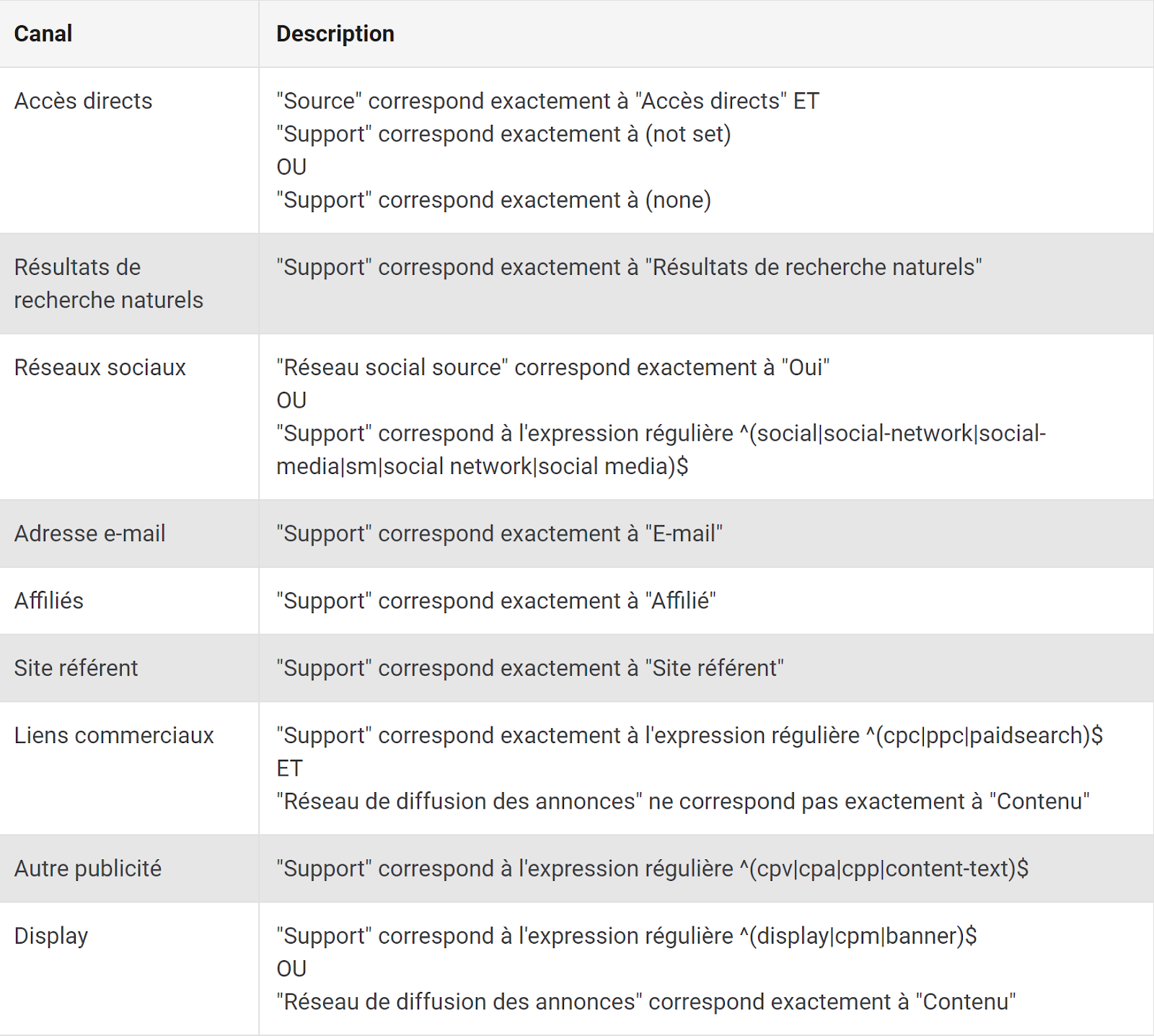
Marketing channels in Google Analytics
Organic is a marketing channel that is set up automatically. Google Analytics says that all visits that come from search engines (excluding paid ads) are considered “organic” visits. Sometimes Google does not update its search engine listing. Some search engines like Ecosia and DuckDuckGo may be placed in the “Referral” channel because Google sometimes sees them as websites rather than search engines.
The Display marketing channel is the one in which data on advertising in banner format must be entered. This is done automatically for the Google Ads Display Network banners. There are different types of advertising agencies that offer banner ads (Display): Facebook, Google, LaPresse.ca, etc. Please note,UTMs must be used for Facebook and local media placements.
The paid channel is used to list paid advertisements that are not banners. Google Ads is tracked in this marketing channel by default. If you want to track other advertisements, you will have to use UTMs.
Social media traffic can be found in “Social”. Be careful, sometimes social visitors will fall into (other) or “Referral”. This isn’t always the case, but if it is for you, then don’t panic. Social traffic from Facebook, Instagram, Twitter or Pinterest is easily recognized by Google Analytics.
Email submissions will be identified by Google Analytics. It is sometimes possible that certain email clients are not recognized and fall into the “Referral” channel or (other) if Google Analytics does not recognize them.
Affiliates are sites that promote your site or your exhibits, products, etc. :
You must specify this marketing channel (UTM_medium) in a UTM. If you don’t, the traffic will go to “Referral”.
This marketing channel is used for all sites that bring you traffic.
When Google sees that you tried to specify a marketing channel but it does not recognize it, the traffic is indicated as (other). This often means that your UTMs are not necessarily correct.
Here is what the “Direct” marketing channel can be:
About the author
Augustin Delporte
Owner and operator of Pragm. GA4, Google Tag Manager, BigQuery, technical SEO, GEO and Google Ads consultant.
Augustin Delporte is a senior marketing expert who helps companies fix their analytics, SEO and Google Ads so they can trust their numbers and get found in Google and AI search.
Besoin de trouve les accès à Google Analytics, de donner les accès à votre agence ou bien de trouver votre numéro de compte ? Lisez ce tutoriel rapide.

Découvrez comment analyser le trafic engendré par les outils IA tels que ChatGPT avec Google Analytics 4 et son nouveau canal dédié.

Comment utiliser les annotations et alertes de Google Analytics (Universal Analytics) pour améliorer votre analyse de données